Professional Webflow development: architecture, best practices, and maintainability

Webflow is often seen as a tool for quickly assembling pages in a visual builder. Professional Webflow development treats it as a complete web development environment with its own architecture, class system, components, CMS Collections, integrations, and quality assurance process. These Webflow development best practices are what make a site scalable and maintainable rather than merely quick to publish.
The visual interface does change how people work. A developer does not need to write every CSS property by hand, and a designer can see the result directly on the page. The browser still receives structure, styles, and scripts, though, and the usual design and development mistakes do not disappear.
The quality of the result depends on the consistency of the decisions behind it and on whether another specialist or team can continue the work later without rebuilding the entire project.
Why Webflow is often mistaken for just a website builder
Traditional visual website builders follow a simple model: choose a template or assemble one from standard components, replace the content, and publish. Webflow looks similar because it offers comparable tools. This creates the false impression that the platform itself guarantees a high-quality result.
In practice, Webflow gives visual access to concepts familiar to any web developer. Elements form a DOM structure, styles live in CSS classes, responsive behavior relies on media queries, and dynamic content comes from the CMS. More complex scenarios use scripts, APIs, and third-party services. The interface makes these layers easier to work with, but it does not design them for the developer.
The same project can be built in very different ways. In one version, pages consist of clear sections, reusable components, and predictable classes. In another, every spacing issue gets its own value, elements are copied without a system and retain outdated settings, and class names record the order of failed attempts: “div-32”, “new-card”, “new-card-2”.
The second approach can be called “vibe coding”: the work is judged by feel. If it looks right now, it is ready to publish. That may be enough for a disposable prototype, landing page, or MVP presentation. On a site that needs to last and grow, however, a small change can affect dozens of elements, while every new page inherits the exceptions accumulated in the previous one. Rebuilding the project eventually starts to look easier than maintaining it.
HTML and CSS still exist beneath the interface
You do not need to write markup by hand every day to work confidently in Webflow. You do need to understand what happens beneath the visual layer.
Semantics
A semantic element defines the meaning of a part of the page. A heading is different from body text, a button is different from a decorative block, and navigation is different from an arbitrary group of links. These choices affect presentation and help search engines, crawlers, and AI agents understand the document structure.
Styling
The same principles apply to CSS. The box model controls dimensions and spacing, Flexbox and Grid control layout, position changes how an element behaves in the document flow, and styles follow the cascade. If a developer does not understand these principles, the visual panel will not solve the problem. It will only make it faster to stack conflicting settings.
Responsive behavior
Responsive behavior is more than rearranging elements at a few standard breakpoints. Content changes constantly: a heading gets longer, a button receives a different label, or a grid contains five cards instead of three. People also use unusual screen sizes, devices, and narrow browser windows. A site therefore needs testing across a range of viewport sizes, including edge cases.
The design process
Website design starts with a set of base rules. The team defines container widths, the grid, a spacing scale, typography, and element behavior on narrow screens. Pages are then built from a limited set of clear decisions. This preparation reduces accidental mistakes and layered exceptions while making reuse and future growth easier to plan.
The class system sets the rules for the project
A class in Webflow stores styles and lets the team apply them to multiple elements. A combo class adds a variation on top of a base class. The mechanism is simple, but without a shared strategy the class list quickly becomes a log of experiments.
The team needs a naming convention. It can use a custom scheme, Client-First, or another approach. The name of the system matters less than consistent application. A new developer should be able to infer a class’s role from its name instead of guessing which page it first appeared on.
It helps to separate several layers:
- global styles for base typography and shared elements;
- utility classes for containers, spacing, and layout;
- component classes for cards, forms, navigation, and sections;
- local exceptions that genuinely will not be reused.
Problems begin when exceptions become the standard workflow. A developer adds a combo class for every new state, duplicates nearly identical values, or fixes the cascade with an even more specific selector. It is faster at first. Later, nobody can tell which change is safe to apply globally.
This is where vibe coding becomes especially visible: a class is named after the first characteristic that comes to mind, then everyone forgets where it is used. Before creating a class, pause for a moment. A suitable rule may already exist. If the solution will recur, it may need a utility class or a component variant. This habit saves more time than a large-scale style cleanup before launch.
Documentation should not describe every click. It is enough to record the naming convention, utility class structure, rules for combo classes, and a few typical examples. A good system explains itself through its names, while the documentation covers ambiguous cases.
Components and variables turn pages into a system
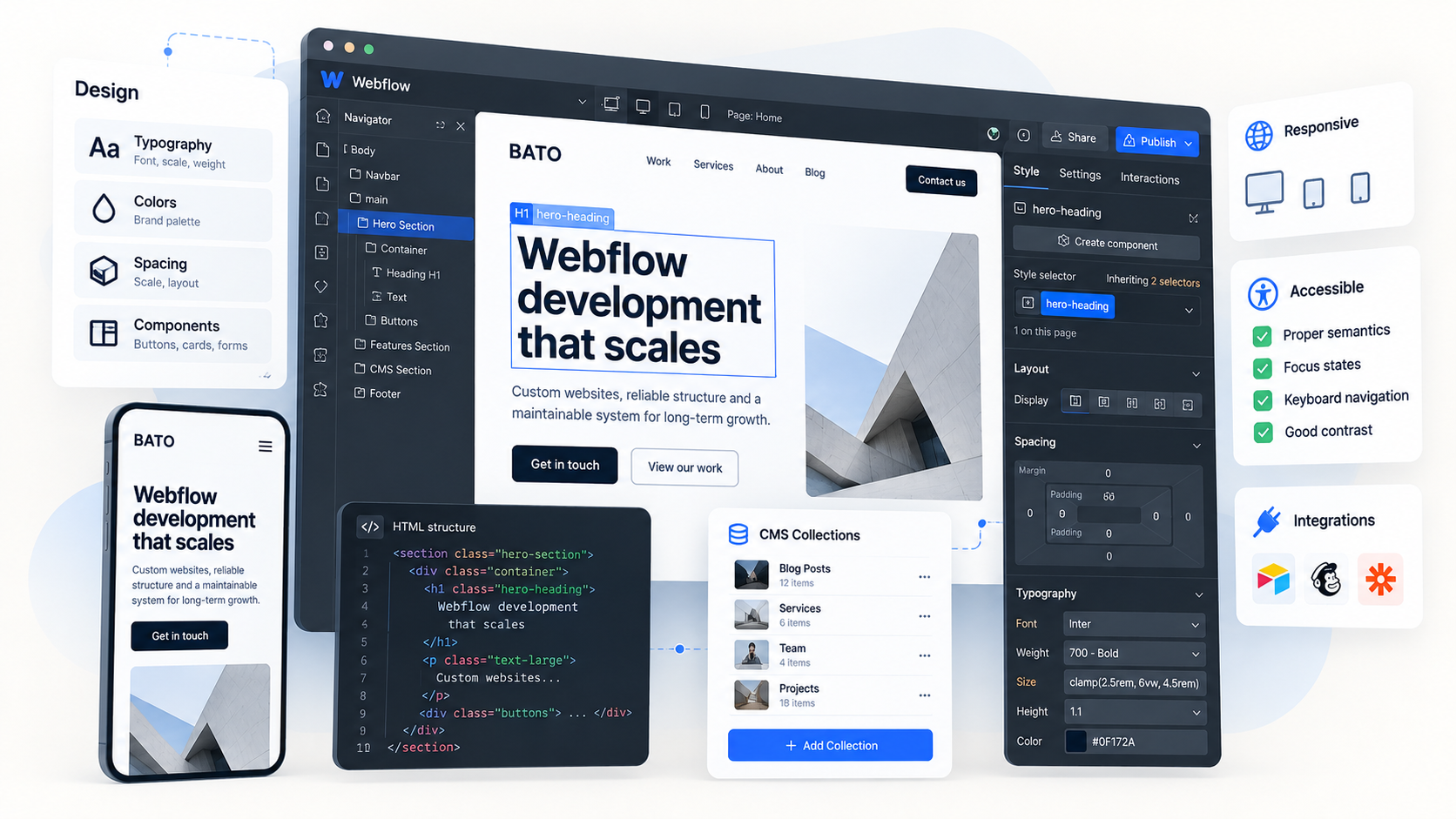
Two blocks that look alike do not automatically belong in the same component. A component is useful when the structure and the way it is used both repeat. A case study card, for example, can share the same markup while receiving different headings, images, links, and visual variants.
In Webflow, the main component stores the shared structure. Individual instances receive their content through properties and slots, while variants manage the supported design options. This lets the team fix a shared element once instead of updating every copy by hand.
Flexibility needs limits. A component with dozens of toggles, mutually exclusive settings, and hidden dependencies is hard to use without a manual. Two clear versions of a section are often more reliable than one “supercomponent” designed to cover every possible future layout.
Variables solve a different problem. They store recurring values for colors, sizes, fonts, and other parameters. If the primary brand color is stored as a variable, the team can update it centrally. If the same color is entered manually in dozens of classes, an update becomes a search for matches, with a real chance of missing some.
A project also benefits from a dedicated utility page for styles and components. It can show typography, buttons, form fields, cards, hover and focus states, and light and dark variants. This page gives developers and designers a shared view of the system instead of forcing them to compare separate screens from memory.
Webflow CMS development starts with a data model
Teams often configure the CMS after the design is finished. They create a “Blog” Collection, add a rich text field, and try to reproduce the completed page. That can work for a small site. Once authors, categories, related content, and localization appear, the structure starts getting in the editorial team’s way.
A better approach is to identify the independent entities first. An article, author, category, case study, and event each have their own fields and lifecycle. Relationships should use reference and multi-reference fields instead of copying an author’s name or a category description into every item. Correcting the source data then updates every place where it appears.
Before building templates, answer a few practical questions. Which fields are required? Who fills them in? Do cards and detail pages need separate images? How is the URL generated? Where does the editor enter metadata? What happens if a field is empty or the text is twice as long as expected?
The CMS should simplify daily work. A marketer should not have to open Designer to publish a standard article, change an author, or add a case study. Field structure, guidance, and constraints should lead editors through a safe workflow. If every publication requires a developer, the dynamic system is effectively operating as a collection of manually assembled pages.
Platform limits also need to be considered early. Collection and item limits, filtering complexity, localization, editor permissions, and integrations depend on the project configuration. The architecture should reflect expected growth, not just the ten items in the CMS today.
Where built-in capabilities end
Webflow is a strong fit for marketing sites, content projects, and many corporate use cases. It does not need to replace a product backend, a complex account system, or a catalog with heavy transactional logic.
Search, advanced forms, CRM connections, user accounts, and data from external systems often require integrations. Sometimes an app or an automation is enough. In other cases, the project needs a separate service with an API. The right choice depends on how critical the scenario is, the security requirements, the data volume, and who will maintain the integration after launch.
Custom code is useful as long as the team controls its purpose and how it is loaded. Problems arise when unnamed, ownerless snippets are scattered across site settings, page settings, and Embed elements. One script loads twice, another depends on a remote library with an unknown version, and a third stops working after the markup changes.
This is another form of vibe coding: find a snippet, paste it, and stop as soon as the effect appears on screen. Professional custom code has a clear purpose, a limited scope, and a recorded version. The team knows where it is loaded, which selectors it depends on, and how to test it after a change.
Sometimes the right decision is to leave part of the project outside Webflow. The platform can handle the public marketing layer while the application runs on another stack. If platform limitations make maintenance expensive or risky, choosing a different tool shows sound judgment, not a lack of loyalty to Webflow.
SEO, accessibility, and performance are part of development
A site cannot be judged only by how closely it matches the design. Search engines need to index it correctly, users need to operate it with a keyboard, and pages need to load without unnecessary delay. These qualities take shape during development. A single setting before publication cannot add them afterwards.
SEO checks cover heading structure, page indexability, canonicals, the sitemap, redirects, metadata, and structured data. The CMS should include fields for unique values and sensible defaults. Editors need to understand which data they are changing, and the team needs to know what happens when a field is left empty.
Accessibility starts with semantic elements. The team then checks Tab order, visible focus, field labels, alt text, contrast, error messages, and the behavior of interactive components. The built-in audit can find some issues, but it cannot complete a user journey in place of a person. Menus, modal windows, tabs, and complex forms still need manual testing.
Performance depends on more than hosting. Heavy images, background video, unnecessary font weights, complex animation, and third-party scripts can slow down an otherwise well-built page. Analytics, chat tools, advertising pixels, and widgets deserve particular attention. Each tool may serve a business need, but the team should understand its performance cost.
Measure performance on the live published site, not only in Designer or Preview. That is where network latency, external code loading order, and behavior on slower devices become visible.
A professional Webflow development process from discovery to support
No single technique determines the quality of a Webflow project. Quality comes from a consistent process.
- During discovery, the team identifies business goals, page types, editor roles, integrations, and constraints. This stage shows whether Webflow is a suitable fit for the whole project.
- Before active development, the team designs the sitemap, content model, design system, and development rules. Decisions are recorded briefly so that everyone involved can use them.
- Implementation proceeds in small blocks. Base styles and key components come first, followed by templates and pages. The team tests a reusable block before it appears in twenty places.
- QA covers responsive behavior, major browsers, keyboard navigation, SEO settings, forms, analytics, and speed. Visual comparison with the design remains part of QA, but it does not replace the other checks.
- Before launch, the team checks domains, redirects, forms, access permissions, analytics, and a rollback plan. Changes are published in a controlled way, not the moment everything “seems ready”.
- After launch, the client receives documentation and training. Editors know what they can change independently and which tasks require a developer.
- The work continues with monitoring for errors, Core Web Vitals, conversions, and friction in the editorial workflow. These signals reveal problems that were not visible in the design.
This workflow may look excessive for a small site. In practice, the depth of each stage changes, not the set of stages itself. A landing page does not need a fifty-page specification, but it still needs clear classes, a tested form, and a controlled release.
Webflow maintenance starts before launch. A useful handoff records the class and component conventions, CMS publishing rules, integration owners, custom code dependencies, and the process for releasing future changes. That documentation reduces the chance that routine updates create local exceptions or break shared behavior.
How to evaluate a Webflow developer or agency
A portfolio shows the visual result but not the state of the underlying system. Ask how the team names classes, structures the CMS, handles responsive edge cases, documents integrations, tests accessibility and performance, and prepares the handoff.
A reliable Webflow development agency should also explain where native capabilities end. If an account system, product backend, or transactional catalog would be safer on another stack, the recommendation should reflect that boundary instead of forcing every requirement into Webflow.
How to assess the quality of a Webflow project
An attractive hero section says little about the state of the underlying system. A more useful review checks whether:
- a new developer can understand the class and component structure without rebuilding it;
- element names in Navigator describe their purpose;
- repeated values use variables and repeated structures use components;
- the layout and text remain intact at intermediate viewport widths;
- an editor can create a standard CMS item without opening Designer;
- the CMS does not store the same data in multiple places;
- pages have editable metadata and a clear heading hierarchy;
- key user journeys work with a keyboard and the focus state is visible;
- images, fonts, and video are prepared for the web;
- third-party scripts are documented, with a purpose and owner for each one;
- forms report success and errors and send data to the correct system;
- redirects and domain settings are checked before launch;
- platform limitations and the growth plan are documented;
- the team knows how to publish future changes safely.
A simple practical test: six months from now, the team needs to update the typography, add a new card variant, and launch a section in another language. If that requires editing every page by hand, the project was built as a collection of screens. If the changes flow through variables, components, and a well-designed content model, Webflow is being used as a development environment.
The number of animations and third-party libraries says nothing about the maturity of a Webflow project. A better measure is how well the site solves today’s problem and how predictably the team can change it tomorrow. Visual tools make the work faster. Architecture, shared rules, testing, and a careful handoff make the result maintainable.
FAQ:
- How can you tell whether a Webflow site is maintainable, not just visually polished?
A maintainable project has predictable class names, reusable components, shared variables, a structured CMS, and documented integrations. It should also remain stable with longer content, unusual viewport widths, and routine edits by the content team. - When should a project use custom code or an external service instead of native Webflow features?
Custom code or an external service makes sense when the project needs capabilities such as advanced search, account logic, complex data processing, or a specialized integration. Each addition should have a defined purpose, scope, owner, version, and testing procedure. - What should be included in a professional Webflow handoff?
The handoff should explain the class and component conventions, CMS structure, publishing workflow, integrations, custom scripts, and safe release process. Editors should know what they can update independently and when a developer is needed. - How does Bato Web Agency structure a Webflow project for future growth?
Our team begins with the sitemap, content model, class strategy, variables, and reusable components before assembling all pages. Key components are tested with real content and responsive edge cases before the team uses them throughout the site. - How does Bato Web Agency test a Webflow site before launch?
We combine visual comparison with responsive and browser testing, keyboard navigation checks, SEO review, form and analytics validation, and performance testing on the published environment. The handoff also covers documentation and editor training.