
Designing a multilingual website architecture for localization and international SEO
Translating the copy and adding a language selector is rarely enough. A multilingual website architecture needs defined URL rules, connections between locale versions, a CMS data model, and a translation update process. Building the website localization strategy early also gives multilingual website SEO a stable technical foundation instead of leaving the team with duplicated pages and constant manual fixes.
Translation is not the same as localization
Translation changes the language of the text. Localization adapts the site to the user’s context, including terminology, familiar formats, currency, contact methods, legal requirements, and interface expectations. Images, examples, testimonials, and even the page structure may also change.
Regionalization is a separate concern. Two versions can use the same language while serving different markets. English pages for the United Kingdom and the United States may differ in pricing, delivery terms, spelling, and commercial offers. The reverse is also possible: one market may need several languages.
A list such as “English, German, French” says too little about the architecture. Before development, it helps to create a language and region matrix. For each locale, the team records the market, language, currency, required legal pages, and available sections. The matrix quickly shows whether the project needs separate regional versions or one shared site in several languages.
Not every page has to launch in every locale at the same time. Missing versions should still be a deliberate decision. Otherwise, a user follows a link and unexpectedly lands on a different language, an outdated offer, or an empty page.
Choose the URL architecture before translation begins
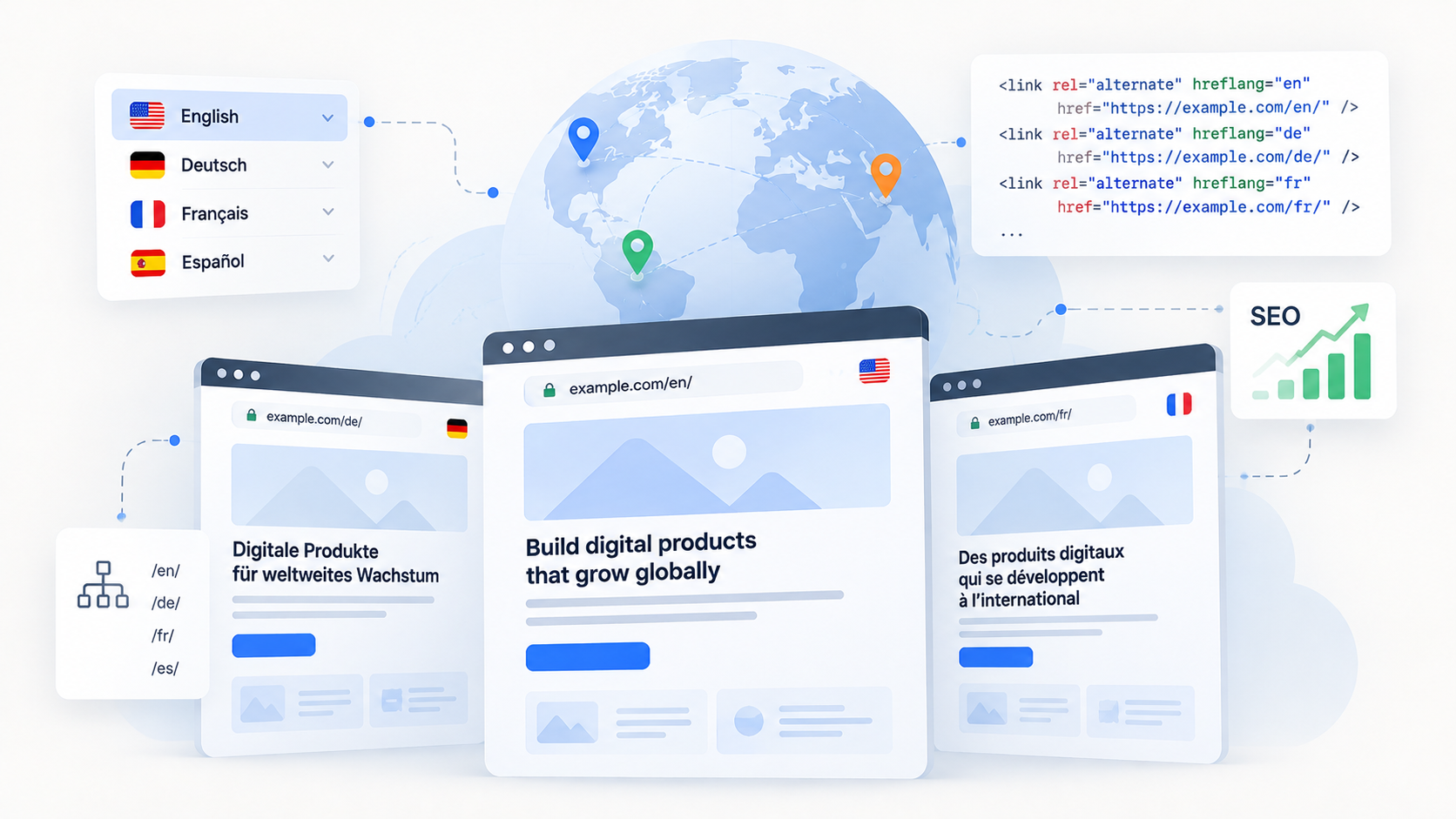
Each indexable language version needs its own URL. Users can open it directly, share the link, and track it separately. Search engines also receive a stable address. Dynamically changing the language on a single URL based on a cookie or browser settings makes indexing harder because a crawler may see only one version.
For most corporate and content sites, subdirectories such as “example.com/en/” and “example.com/fr/” work well. All versions remain on one domain, which makes analytics, templates, and technical settings easier for the team to manage.
Subdomains such as “fr.example.com” give infrastructure and local teams more autonomy. The tradeoff is the need to maintain several configurations and monitor consistency across the site.
Country-code domains such as “example.de” clearly associate a site with a specific country. This model makes sense when markets differ substantially or local teams work almost independently. It requires more maintenance and does not suit a language that is not tied to one country.
Automatic language detection can work as a suggestion, but it should not become a restriction. The site may recommend a suitable version and remember the choice. Users must still be able to open another locale, and crawlers need standard links to every available version.
Locale model, language selector, and fallback
The locale model describes the available versions and the relationships between them. The code “en” means general English, while “en-GB” or “pt-BR” specifies a region. Add a region only when it changes the content or business logic. Dozens of nominally different locales with identical pages only make maintenance harder.
The model defines the primary locale and maps equivalent pages. A language selector should take a user from an English service page to its German counterpart instead of sending them back to the homepage every time. The CMS or routing layer therefore needs to know which entries are variants of the same piece of content.
The fallback also needs a clear rule. If a translation is missing, the site can hide the unavailable link, show the source version with an explicit notice, or suggest the nearest available page. A poor fallback leaves “/fr/” in the URL while the main copy remains in English. The user sees a mixed-language interface, and the search engine receives an unclear signal about the page language.
Components must also accommodate longer text. A short English button label may wrap onto two lines after translation. Arabic and Hebrew require right-to-left direction, including element order, icons, and mixed-text behavior. Treating these cases as part of RTL website design costs less than fixing them page by page.
URL, hreflang, and canonical work together
Separate URLs solve only part of the problem. Search engines need to know which pages are language or regional versions of one another. Sites communicate these relationships through “hreflang” in HTML, HTTP headers, or an XML sitemap. The team will usually choose one method that it can maintain consistently.
Each page in a group lists itself and every other available version. The relationships must be reciprocal: if the English page points to the German page, the German page must point back to the English one. In “hreflang”, the language comes first, followed by the region when needed, as in “en-GB”. A country code on its own is not valid here.
The “x-default” value can point to a neutral selector page or to a version intended for users who do not match any listed locale. It is not a mandatory fallback link for every project. It is a separate part of a considered setup.
“Canonical” identifies the preferred URL among duplicates and does not replace “hreflang”. Fully translated pages usually have self-referencing canonical URLs. If regional pages in the same language are almost identical, the canonical must be chosen carefully within the same language group or toward the closest suitable language version.
Search engines determine a page’s language mainly from its visible content. The “lang” attribute on the “html” element still matters because browsers and assistive technologies use it. Metadata and search queries also need localization for the market. A literal translation of a target phrase may differ from the wording people actually use when searching for the service.
Localized keyword research is part of international SEO
People in different markets may use different terms for the same service, even when the source text has an accurate translation. Localized keyword research should therefore inform page titles, headings, body copy, metadata, and slugs rather than being added after the translation is complete.
For each locale, record the primary search intent, the preferred local term, and any regional wording that affects commercial pages. This keeps the translated page natural for readers while giving international SEO decisions a documented source.
A multilingual CMS and its components need to understand locales
It helps to separate three kinds of data in the CMS. Global fields stay the same across versions. Translatable fields receive a value for each locale, while regional fields can be overridden for a specific market. A card structure, for example, may remain shared while its heading is translated and its price and legal note depend on the region.
Copying the entire site for every language quickly creates inconsistencies. The team fixes a component in one version, forgets the second, and a few months later the sites follow different rules. Separate projects make sense when the markets genuinely have different products, teams, or requirements. A language difference alone is usually not enough.
Multilingual support must extend to slugs, categories, filters, and the search index. The CMS also needs translation statuses such as draft, in review, ready to publish, published, or outdated. When an author changes the source content, the related translation should not silently remain marked as current. The system should create an update task or at least flag the discrepancy.
This process is especially important for shared components and repeated copy. If the same label is stored in five places, translators have to correct it five times. A single source reduces both the workload and inconsistencies in terminology.
The translation process covers the whole user journey
Manual translation suits a site with little content and infrequent updates. Machine or AI translation produces broader draft coverage faster, but it needs rules for brand terminology and review of important pages. Human translation handles nuance better, though it costs more and takes longer. Many teams use a hybrid process: the system prepares a draft, and a specialist reviews priority content.
Consistent quality requires a glossary, translation memory, and a short style guide. The team also defines the roles of the author, translator, local editor, and publisher. Review requirements can vary because a legal page and a long archived article carry different levels of risk.
Translating the main copy does not complete the work. The team must check menus, buttons, forms, error messages, emails, the cookie interface, and search results. Dates, numbers, currencies, units of measurement, addresses, and phone numbers also need localization. Alt text, Open Graph content, file names, and third-party widgets require separate checks. External widgets often remain in the source language even when the page itself has been translated.
Multilingual website QA and launch readiness
Before publication, the team checks four layers. Linguistic QA covers meaning, terminology, and tone. Functional QA tests links, forms, search, and interactive states. Technical SEO QA checks response codes, indexability, canonicals, “hreflang”, and the sitemap. Accessibility QA covers the “lang” attribute, keyboard navigation, reading order, and interface messages.
In practice, the site is ready to launch when:
- each published locale has a direct URL;
- the language selector opens the equivalent page without taking away the user’s choice;
- “hreflang” groups are reciprocal and their canonicals do not conflict with them;
- pages do not mix languages without a clear explanation;
- long strings do not break components or forms;
- emails, errors, and third-party elements match the selected locale;
- changes to source content mark related translations for review;
- analytics can compare traffic and conversions across languages and markets.
When language is part of the architecture, the team can add a new locale according to established rules. It receives its own URLs, linked CMS entries, translation statuses, and QA process. The team does not have to copy the site with all its old mistakes or reinvent the workflow for every new market.
FAQ:
- Does every language or regional version need its own URL? Every indexable version should have a stable URL that users and search engines can access directly. Changing the language on one URL through cookies or browser settings can prevent crawlers from discovering all available versions.
- What should happen when a translation is unavailable? The site needs a deliberate fallback rule. It can hide the unavailable locale, show the source version with a clear notice, or suggest the closest available page. It should not keep a localized URL while silently displaying content in another language.
- How can a team prevent translations from becoming outdated? The CMS should connect equivalent entries and track statuses such as draft, review, published, and outdated. When source content changes, the related translations should be flagged for review instead of remaining marked as current.
- How does Bato Web Agency choose the URL and locale structure for a multilingual site? Our team starts with a matrix of languages, markets, currencies, legal requirements, and available sections. The team then chooses between subdirectories, subdomains, or country domains based on actual differences in content, infrastructure, and ownership.
- How does Bato Web Agency validate a multilingual website before launch? We check linguistic accuracy, localized user journeys, forms and integrations, accessibility, indexability, canonicals, hreflang relationships, and the sitemap. The language selector is also tested to ensure that it opens the equivalent page without overriding the user’s choice.